
Tuesday, April 24, 2012

BoepClub
So we have a proper club now called BoepClub, it is made up of the following members: (at one stage you had to have someone with the same name if you wanted in)

- Andrew H
- Andrew M
- Craig B
- Craig E
- Shaun K
- Sean Rose
- Chris K
- Chris S
- Jacques H
- Adrian DH
- Mike M
- ?

Thursday, September 16, 2010
N+ Damelin
So, we still dont have our results for the course! Seriously taking a long time - I guess it is what to be expected after the course was run so badly! Damelin really dropped the ball in the instance!!!
Well I was able to get the results of my exam "unofficially" I didn't make it to top of the class but 2nd will have to do at 97%. Whoohoo!
I guess that the Blog can go back to toys now!
Well I was able to get the results of my exam "unofficially" I didn't make it to top of the class but 2nd will have to do at 97%. Whoohoo!
I guess that the Blog can go back to toys now!
Friday, March 26, 2010
Lesson 12 and 13
Lesson 12
TCP/IP Protocol Suite
The internet Protocol – (IP)
This serves to assign the correct destination address to a data packet. IP uses subnet mask to determine the if the receiving node is on the same subnet or a remote network and delivers the packet.
The address Resolution Protocol (ARP)
Address resolution protocol supports the internet protocol by resolving IP addresses to the MASC address.
Reverse Address Resolution Protocol (RARP)
RARP is a protocol that allows a node on a local area network to discover its IP address from a routers ARP table or cache.
The Internet Control Message Protocol (ICMP)
The internet control message protocol is a service added to the IP protocol that attempts to report on the condition of the connection, ICMP messages notify a sender of network conditions by reporting IP errors.
The Internet Management Protocol (IGMP)
IGMP supports multicasting in a routed environment. The router uses the IMGP to poll its interfaces for members of the multicast group and the forwards the multicast transmission to the group members.
PORTS
All ports are assigned a number in a range from 0 – 65535. The IANA separates the port numbers into three blocks:
1. Well known ports, which are assigned by system process by IANA
2. Registered ports, which are available to user processes and are listed as a convenience by IANA
3. Dynamic ports, this are assigned by a client operating system as needed when there is a request for service.
Port Ranges, well know/used ports:
• 21 – ftp (file transfer protocol) used for download
• 23 – Telnet, remote login protocol
• 25 – SMTP (simple mail transfer protocol) used for sending mail
• 53 – dns (domain name service) changes the IP address into a user-friendly name
• 80 – http (hypertext transfer protocol) internet access
• 110 – pop3 (post office protocol number 3)
• 143 – impa (internet message access protocol)
• 161 – snmp (simple network management protocol)
• 443 – https (secure http)
UDP ports:
• 7 – echo (PING)
• 123 – ntp (network time protocol)
Sockets
A socket is a piece of software within an operating system that connects an application with a network protocol.
IP Address Assignment Methods
Static and Dynamic addressing – IP addresses can either be assigned manually to make them static to a node on the network or it can be assigned dynamically by the DHCP service.
DHCP – Dynamic Host Configuration Protocol
DHCP is a network service that provides automatic assignment of IP addresses and other TCP/IP configuration information in the network nodes that are configured as DHCP clients.
DHCP Lease process

APIPA – Automatic Private IP Addressing
APIPA is a service that enables a DHCP client computer to configure itself automatically with an IP Address in the range of 169.254.0.1 to 169.254.255.254 if no DHCP servers respond to the clients DHCP discover broadcast.
The Ping utility:
You can ping a computer to confirm its connectivity to a network.
Ping options are as follows:
You can ping by IP address
You can ping the loopback address (127.0.0.1) to test whether TCP/IP has initialised on an individual system. If the computer has a default gateway, you can ping the remote system.
Some of the options include setting up the packet size, changing the time to live (TTL) value and specify how many times to ping the host.
Ping Blocking
As a security measure, some public internet hosts and internet routers might be configured to block incoming packets that are generated by that ping command.
IP Configuration Utilities.
Winipcfg – Windows 98, 95, ME
Ipconfig – Server 2008, 2003 and windows 2000 as well as XP Vista and NT
Ifconfig – Linux and UNIX
Dhclient – Linux and UNIX (the dhclient utility allows you to configure and manage dhcp settings the network interfaces on a computer.
Ipconfig Commands for DHCP: (for enabling dynamic address lease management)
Ipconfig/release – forces the release of the IP address of a network connection
Ipconfig/renew – request the renewal of the lease.
If the DHCP is non-responsive, the server will revert to the APIPA.
DNS – Domain Name System
The DNS is a TCP/IP name resolution service that translates FQDN’s into IP addresses. It consists of a system of databases that are stored on separate DNS servers on all networks that are connected to the Internet. All servers work together to resolve the FQDN’s (Fully Qualified Doman Name). On internal networks a local DNS service can resolve host names without using the external DNS servers.
The HOSTS file
A HOSTS file is a plain text file configured on a client machine containing a list of IP addresses and their associated host names.
The HOSTS file provides an alternative method of host name resolution. An external client can use a HOSTS file to resolve names on your internal network without needing to access to your internal DNS server.
NetBIOS Names
NEtBIOS names are computer names that take a 16-byte common name format developed by IBM and Microsoft to identify the network devices. Fifteen bytes represent characters in the name; the hidden 16th byte is a code to denote the type of service provided by the device. NetBIOS names must be unique on the network.
NetBIOS Name Resolution Methods:
• NetBIOS broadcast name resolution – for data delivery, NetBIOS names must be resolved to the MAC addresses.
• WINS – WINS is Microsoft’s NetBIOS name server which was developed to reduce the number of NetBIOS name resolution broadcasts.
• The LMHOSTS File – an LMHOSTS file is a text file that contains NetBIOS name-to-IP Address mappings, each on a separate line. The IP address is listed first, then a space, and then the associated NetBIOS name.
TCP/IP Protocol Suite
The internet Protocol – (IP)
This serves to assign the correct destination address to a data packet. IP uses subnet mask to determine the if the receiving node is on the same subnet or a remote network and delivers the packet.
The address Resolution Protocol (ARP)
Address resolution protocol supports the internet protocol by resolving IP addresses to the MASC address.
Reverse Address Resolution Protocol (RARP)
RARP is a protocol that allows a node on a local area network to discover its IP address from a routers ARP table or cache.
The Internet Control Message Protocol (ICMP)
The internet control message protocol is a service added to the IP protocol that attempts to report on the condition of the connection, ICMP messages notify a sender of network conditions by reporting IP errors.
The Internet Management Protocol (IGMP)
IGMP supports multicasting in a routed environment. The router uses the IMGP to poll its interfaces for members of the multicast group and the forwards the multicast transmission to the group members.
PORTS
All ports are assigned a number in a range from 0 – 65535. The IANA separates the port numbers into three blocks:
1. Well known ports, which are assigned by system process by IANA
2. Registered ports, which are available to user processes and are listed as a convenience by IANA
3. Dynamic ports, this are assigned by a client operating system as needed when there is a request for service.
Port Ranges, well know/used ports:
• 21 – ftp (file transfer protocol) used for download
• 23 – Telnet, remote login protocol
• 25 – SMTP (simple mail transfer protocol) used for sending mail
• 53 – dns (domain name service) changes the IP address into a user-friendly name
• 80 – http (hypertext transfer protocol) internet access
• 110 – pop3 (post office protocol number 3)
• 143 – impa (internet message access protocol)
• 161 – snmp (simple network management protocol)
• 443 – https (secure http)
UDP ports:
• 7 – echo (PING)
• 123 – ntp (network time protocol)
Sockets
A socket is a piece of software within an operating system that connects an application with a network protocol.
IP Address Assignment Methods
Static and Dynamic addressing – IP addresses can either be assigned manually to make them static to a node on the network or it can be assigned dynamically by the DHCP service.
DHCP – Dynamic Host Configuration Protocol
DHCP is a network service that provides automatic assignment of IP addresses and other TCP/IP configuration information in the network nodes that are configured as DHCP clients.
DHCP Lease process

APIPA – Automatic Private IP Addressing
APIPA is a service that enables a DHCP client computer to configure itself automatically with an IP Address in the range of 169.254.0.1 to 169.254.255.254 if no DHCP servers respond to the clients DHCP discover broadcast.
The Ping utility:
You can ping a computer to confirm its connectivity to a network.
Ping options are as follows:
You can ping by IP address
You can ping the loopback address (127.0.0.1) to test whether TCP/IP has initialised on an individual system. If the computer has a default gateway, you can ping the remote system.
Some of the options include setting up the packet size, changing the time to live (TTL) value and specify how many times to ping the host.
Ping Blocking
As a security measure, some public internet hosts and internet routers might be configured to block incoming packets that are generated by that ping command.
IP Configuration Utilities.
Winipcfg – Windows 98, 95, ME
Ipconfig – Server 2008, 2003 and windows 2000 as well as XP Vista and NT
Ifconfig – Linux and UNIX
Dhclient – Linux and UNIX (the dhclient utility allows you to configure and manage dhcp settings the network interfaces on a computer.
Ipconfig Commands for DHCP: (for enabling dynamic address lease management)
Ipconfig/release – forces the release of the IP address of a network connection
Ipconfig/renew – request the renewal of the lease.
If the DHCP is non-responsive, the server will revert to the APIPA.
DNS – Domain Name System
The DNS is a TCP/IP name resolution service that translates FQDN’s into IP addresses. It consists of a system of databases that are stored on separate DNS servers on all networks that are connected to the Internet. All servers work together to resolve the FQDN’s (Fully Qualified Doman Name). On internal networks a local DNS service can resolve host names without using the external DNS servers.
The HOSTS file
A HOSTS file is a plain text file configured on a client machine containing a list of IP addresses and their associated host names.
The HOSTS file provides an alternative method of host name resolution. An external client can use a HOSTS file to resolve names on your internal network without needing to access to your internal DNS server.
NetBIOS Names
NEtBIOS names are computer names that take a 16-byte common name format developed by IBM and Microsoft to identify the network devices. Fifteen bytes represent characters in the name; the hidden 16th byte is a code to denote the type of service provided by the device. NetBIOS names must be unique on the network.
NetBIOS Name Resolution Methods:
• NetBIOS broadcast name resolution – for data delivery, NetBIOS names must be resolved to the MAC addresses.
• WINS – WINS is Microsoft’s NetBIOS name server which was developed to reduce the number of NetBIOS name resolution broadcasts.
• The LMHOSTS File – an LMHOSTS file is a text file that contains NetBIOS name-to-IP Address mappings, each on a separate line. The IP address is listed first, then a space, and then the associated NetBIOS name.
Friday, March 5, 2010
Lesson 11
Quick Recap of Lesson 10:
Key Acronym: OSPF – open shortest path first!
Classfull and Classless IP Addresses:
A 1 – 127 255.0.0.0
B 128 – 191 255.255.0.0
C 192 – 223 255.255.255.0
127 is used for pinging thus is completely excluded. There are also classes D and E but we do not need to know them just that they are there.
The default Subnet mask looks like: 255(which is network).0.0.0 (which are the nodes)
Subnet masking is for:
1. Manipulating collision domains
2. Calculating how many nodes are available on a network
Network ID
If the network ID is 121.0.0.1 then the first usable address would be 121.0.0.2
Custom IP Addresses
TCP/IP Subnets
• TCP/IP is a subnet class of leased addresses that has been divided up into smaller groups to serve all the network needs. A custom TCP/IP subnet has a custom subnet mask and ANDed to the IP Address, so that what the node sees as its local network is a subset of the whole default network address block.
• A default gateway is configured for each subnet to route traffic between the subnets.
Custom subnet masks:
• Custom Subnet masks on a Class C Network
Last octet of New Mask in Binary – New Mask Decimal - # of added networks – Nodes per network
10000000 255.255.255.128 2 126
11000000 255.255.255.192 4 62
11100000 255.255.255.224 8 30
11110000 255.255.255.240 16 14
11111000 255.255.255.248 32 6
11111100 255.255.255.252 64 2

To determine available host addresses:
The number of host address on a custom subnet is a function of the total number of address bits available for host addressing. The formula is 2 to the power or x – 2 where x is the number of host bits!
Classless Inter Domain Routing (CIDR)
• CIDR is a subnetting method that treats a VLSM as a 32 bit binary word. The mask bits can move in one bit increments to provide the exact number of nodes and networks required. CIDR notation combimes the network address with a single number to represent the number of one bits in the mask. With CIDR, multiple class based networks can be represented as a single block.
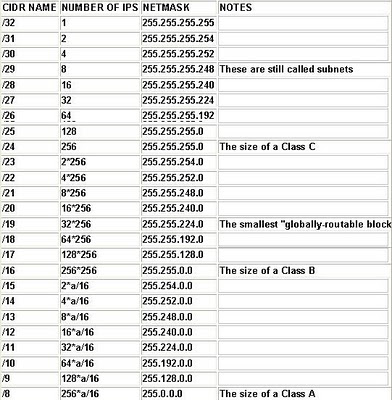
The TCP/IP Protocol Suite:
The TCP/IP Network model is a 4 layer network model which loosely follows the OSI model, the application layer maps the application, presentation and session layers in the OSI model.

3 things to remember to configure on a PC for TCP/IP addressing:
1. IP Address\
2. Subnet Mask
3. Default Gateway
Classless IP’s
How to determine your network ID?
How to determine your network mask?
EASY – RUN, CMD, ipconfig all
Key Acronym: OSPF – open shortest path first!
Classfull and Classless IP Addresses:
A 1 – 127 255.0.0.0
B 128 – 191 255.255.0.0
C 192 – 223 255.255.255.0
127 is used for pinging thus is completely excluded. There are also classes D and E but we do not need to know them just that they are there.
The default Subnet mask looks like: 255(which is network).0.0.0 (which are the nodes)
Subnet masking is for:
1. Manipulating collision domains
2. Calculating how many nodes are available on a network
Network ID
If the network ID is 121.0.0.1 then the first usable address would be 121.0.0.2
Custom IP Addresses
TCP/IP Subnets
• TCP/IP is a subnet class of leased addresses that has been divided up into smaller groups to serve all the network needs. A custom TCP/IP subnet has a custom subnet mask and ANDed to the IP Address, so that what the node sees as its local network is a subset of the whole default network address block.
• A default gateway is configured for each subnet to route traffic between the subnets.
Custom subnet masks:
• Custom Subnet masks on a Class C Network
Last octet of New Mask in Binary – New Mask Decimal - # of added networks – Nodes per network
10000000 255.255.255.128 2 126
11000000 255.255.255.192 4 62
11100000 255.255.255.224 8 30
11110000 255.255.255.240 16 14
11111000 255.255.255.248 32 6
11111100 255.255.255.252 64 2

To determine available host addresses:
The number of host address on a custom subnet is a function of the total number of address bits available for host addressing. The formula is 2 to the power or x – 2 where x is the number of host bits!
Classless Inter Domain Routing (CIDR)
• CIDR is a subnetting method that treats a VLSM as a 32 bit binary word. The mask bits can move in one bit increments to provide the exact number of nodes and networks required. CIDR notation combimes the network address with a single number to represent the number of one bits in the mask. With CIDR, multiple class based networks can be represented as a single block.

The TCP/IP Protocol Suite:
The TCP/IP Network model is a 4 layer network model which loosely follows the OSI model, the application layer maps the application, presentation and session layers in the OSI model.

3 things to remember to configure on a PC for TCP/IP addressing:
1. IP Address\
2. Subnet Mask
3. Default Gateway
Classless IP’s
How to determine your network ID?
How to determine your network mask?
EASY – RUN, CMD, ipconfig all
Friday, February 19, 2010
Lesson 10
Okay, work has been hectic this week so once again I am only getting to this on a Friday! Gotta do it now as I expect to be in Forries before 3!
Quick recap:
802.3 – Ethernet
802.5 – Ring
802.11(x) – Wireless
Key Acronyms:
• FHSS – Frequency Hopping Spread Spectrum
• DSSS - Direct Sequence Spread Spectrum
• Multiplexing – send and receive on same channel
Wireless:
• 802.11
o Has transmission speeds of 1 or 2 Mbps
o Radio frequency of 2.4GHz
o One variation uses FHSS and one uses DSSS
• 802.11.a
o Speeds up to 54Mbps
o 5 GHz band
o Transmission typically at 6, 12 or 24Mbps
o Uses orthogonal frequency division multiplexing (OFDM)
o Range roughly 20 metres
• 802.11b
o Speed – 11Mbps
o 2.4GHz
o Range 100 metres
• 802.11g
o Speed 54Mbps
o 2.5GHz
o Average speeds 20-25Mbps
o Range – 100 metres
• 802.11n
o Speeds up to 300Mbps
o Two streams so 600Mbps
o 2.4GHz or 5GHz frequency
Channels in 802.11b/g Implementation:
Overlap in the radio signals or bleeding can occur when these overlap between adjacent accesses points and clients. The best channels to use to avoid this are channels: 1, 6 and 11.
802.11 Modes:
You get infrastructure and ad hoc modes
Infrastructure mode is when the WAP is hardwired to the network (server) and the workstations connect wirelessly. Uses BSS (basic service set) or ESS (Extended service set) as the protocol
Ad hoc is when the workstations connect to the WAP wirelessly and there is no hardwired backbone. This uses the protocol IBSS (independent basic service set)
WLAN Architecture: see page 190, not important.
Protocols:
• BSS (Basic Service Set)
o One access point connected to a wired network and has one or more wireless stations or clients. A BSS is also referred to as Infrastructure mode as it requires an access point in order to transmit data
• ESS (Extended Service Set)
o The ESS comprises two or more BSS’s that are connected to a common distribution system such as a wired network. An ESS must contain at least two wireless access points operating in infrastructure mode, which allows clients to use their AP depending on the locations of the wireless station or point.
• ESSID (Extended Service Set ID)
o The ESSID is the name that identifies a wireless network or wireless access point so that you can identify the networks clearly.
• IBSS (Independent Basic Service Set
o IBSS does not contain an AP. It is a peer to peer network in which each wireless station or client has its own wireless network adapter and each acts as both client and wireless AP.
802.11 BEACONS
Beacon frames are management frames that are only 50 bytes long. They are used to start and maintain wireless communication. They contain information about the communication process such as the STA and SSID, channel number and security protocol.
Wire Equivalent Privacy (WEP)
• To prevent eavesdropping, IEEE 802.11 WEP defines and algorithm that gives authorised users the same level of security they would on a wired network.
WIFI Protected Access (WPA)
• WPA is a Wi-Fi standard that was designed to improve upon the security flaws of WEP. WPA2 is an upgrade and includes all the 802.11 mandatory standards.
• It improves data encryption through the Temporal Key Integrity Protocol (TKIP).
• WPA adds AES a cipher based CCMP encryption for even greater security.
• User authentication, considered poor over WEP through the EAP (Extensible Authentication Protocol). WEP regulates access to the wireless network based on the computers specific MAC address which is relatively easy to sniff or spoof.
• EAP is built on a more secure public key encryption system to ensure that only the authorised network users can access the network.
Wireless Authentication Methods:
Authentication Method Description
Open System This uses null authentication
Shared Key This authentication method verifies the identity of a station by using a WEP key. Both the station and the AP must be configured to use the data encryption and the same WEP key
802.1x and EAP This authentication method authenticates the user and not the station. A RADIUS server is used – Remote Authentication Dial In Server – the user dials in to the server which disconnects the call and will return the call and reconnect.
Bluetooth
• This is not a network service, it is peer-to-peer
• Bluetooth 1.1 is a wireless protocol used to communicate form device to device in a small area up to 10 metres, transfer is approximately 1Mbps.
• Bluetooth 1.2 increases speed to 2.1-3Mbps and the range increases to about 30 metres.
Networking with TCP/IP
Families and Protocols:
• Successful network communications hinges on them sharing a network protocol to perform various functions related to that communication.
• Network protocols are classified into general families that share common features.
Network Protocols:
Network communications between computers is provided by a network protocol – rules by which network operations are conducted.
There are the following Protocols:
• Network and transport layer protocols
• Application – Presentation- and session layer Protocols
Protocol Bindings:
Assigning a protocol to a network interface card (NIC) is referred to as protocol binding. Multiple protocols can be bound to a single NIC. The NIC can use any of the protocols that are bound to it to communicate with other nodes on the network.
Binding order:
A network interface bound with multiple protocols attempts to connect to a receiving node by testing its available protocols, one by one until it finds a protocol that the receiving node answers.
The TCP/IP Protocol:
This is a protocol suite which works at the network and transport layers of the OSI model. Providing the protocol family functions of reliability, connection and routing.
TCP/IP
The transmission Control/Internet protocol (TCP/IP) is a non-proprietary, routable network protocol suit that enables computers to communicate over all types of networks. TCP/IP is the native protocol of the Internet and is required for Internet connectivity.
IPv4 Addresses:
An IPv4 Address is a 32 bit binary number assigned to a computer on a TCP/IP Network. The 32 bit binary IP Address is usually separated by dots into four 8 bit octets.
• Binary = 11010000.01111011.00101101.00010010
• Decimal = 208.123.45.18
Dotted decimal Notation – this is how TCP/IP address is usually displayed!
An IP address is like a mailing address:
Some of the numbers in the IP address identify the network segment on which computer resides, just as a person mailing address uses a street name etc.
Binary and Decimal Conversion:
Binary is a base 2 numbering system in which any bit in the number is either 1 or 0
Standard Speed Frequency Approximate Range
802.11 1-2Mbps 2.4GHz 100 metres
802.11a 54Mbps 5GHZ 20 metres
802.11b 11Mbps 2.4GHz 100 metres
802.11g 54Mbps 2.4GHz 100 metres
802.11n 300Mbps 2.4 or 5MHz 70 metres
Well that is it for now - see you all tomorrow.
Quick recap:
802.3 – Ethernet
802.5 – Ring
802.11(x) – Wireless
Key Acronyms:
• FHSS – Frequency Hopping Spread Spectrum
• DSSS - Direct Sequence Spread Spectrum
• Multiplexing – send and receive on same channel
Wireless:
• 802.11
o Has transmission speeds of 1 or 2 Mbps
o Radio frequency of 2.4GHz
o One variation uses FHSS and one uses DSSS
• 802.11.a
o Speeds up to 54Mbps
o 5 GHz band
o Transmission typically at 6, 12 or 24Mbps
o Uses orthogonal frequency division multiplexing (OFDM)
o Range roughly 20 metres
• 802.11b
o Speed – 11Mbps
o 2.4GHz
o Range 100 metres
• 802.11g
o Speed 54Mbps
o 2.5GHz
o Average speeds 20-25Mbps
o Range – 100 metres
• 802.11n
o Speeds up to 300Mbps
o Two streams so 600Mbps
o 2.4GHz or 5GHz frequency
Channels in 802.11b/g Implementation:
Overlap in the radio signals or bleeding can occur when these overlap between adjacent accesses points and clients. The best channels to use to avoid this are channels: 1, 6 and 11.
802.11 Modes:
You get infrastructure and ad hoc modes
Infrastructure mode is when the WAP is hardwired to the network (server) and the workstations connect wirelessly. Uses BSS (basic service set) or ESS (Extended service set) as the protocol
Ad hoc is when the workstations connect to the WAP wirelessly and there is no hardwired backbone. This uses the protocol IBSS (independent basic service set)
WLAN Architecture: see page 190, not important.
Protocols:
• BSS (Basic Service Set)
o One access point connected to a wired network and has one or more wireless stations or clients. A BSS is also referred to as Infrastructure mode as it requires an access point in order to transmit data
• ESS (Extended Service Set)
o The ESS comprises two or more BSS’s that are connected to a common distribution system such as a wired network. An ESS must contain at least two wireless access points operating in infrastructure mode, which allows clients to use their AP depending on the locations of the wireless station or point.
• ESSID (Extended Service Set ID)
o The ESSID is the name that identifies a wireless network or wireless access point so that you can identify the networks clearly.
• IBSS (Independent Basic Service Set
o IBSS does not contain an AP. It is a peer to peer network in which each wireless station or client has its own wireless network adapter and each acts as both client and wireless AP.
802.11 BEACONS
Beacon frames are management frames that are only 50 bytes long. They are used to start and maintain wireless communication. They contain information about the communication process such as the STA and SSID, channel number and security protocol.
Wire Equivalent Privacy (WEP)
• To prevent eavesdropping, IEEE 802.11 WEP defines and algorithm that gives authorised users the same level of security they would on a wired network.
WIFI Protected Access (WPA)
• WPA is a Wi-Fi standard that was designed to improve upon the security flaws of WEP. WPA2 is an upgrade and includes all the 802.11 mandatory standards.
• It improves data encryption through the Temporal Key Integrity Protocol (TKIP).
• WPA adds AES a cipher based CCMP encryption for even greater security.
• User authentication, considered poor over WEP through the EAP (Extensible Authentication Protocol). WEP regulates access to the wireless network based on the computers specific MAC address which is relatively easy to sniff or spoof.
• EAP is built on a more secure public key encryption system to ensure that only the authorised network users can access the network.
Wireless Authentication Methods:
Authentication Method Description
Open System This uses null authentication
Shared Key This authentication method verifies the identity of a station by using a WEP key. Both the station and the AP must be configured to use the data encryption and the same WEP key
802.1x and EAP This authentication method authenticates the user and not the station. A RADIUS server is used – Remote Authentication Dial In Server – the user dials in to the server which disconnects the call and will return the call and reconnect.
Bluetooth
• This is not a network service, it is peer-to-peer
• Bluetooth 1.1 is a wireless protocol used to communicate form device to device in a small area up to 10 metres, transfer is approximately 1Mbps.
• Bluetooth 1.2 increases speed to 2.1-3Mbps and the range increases to about 30 metres.
Networking with TCP/IP
Families and Protocols:
• Successful network communications hinges on them sharing a network protocol to perform various functions related to that communication.
• Network protocols are classified into general families that share common features.
Network Protocols:
Network communications between computers is provided by a network protocol – rules by which network operations are conducted.
There are the following Protocols:
• Network and transport layer protocols
• Application – Presentation- and session layer Protocols
Protocol Bindings:
Assigning a protocol to a network interface card (NIC) is referred to as protocol binding. Multiple protocols can be bound to a single NIC. The NIC can use any of the protocols that are bound to it to communicate with other nodes on the network.
Binding order:
A network interface bound with multiple protocols attempts to connect to a receiving node by testing its available protocols, one by one until it finds a protocol that the receiving node answers.
The TCP/IP Protocol:
This is a protocol suite which works at the network and transport layers of the OSI model. Providing the protocol family functions of reliability, connection and routing.
TCP/IP
The transmission Control/Internet protocol (TCP/IP) is a non-proprietary, routable network protocol suit that enables computers to communicate over all types of networks. TCP/IP is the native protocol of the Internet and is required for Internet connectivity.
IPv4 Addresses:
An IPv4 Address is a 32 bit binary number assigned to a computer on a TCP/IP Network. The 32 bit binary IP Address is usually separated by dots into four 8 bit octets.
• Binary = 11010000.01111011.00101101.00010010
• Decimal = 208.123.45.18
Dotted decimal Notation – this is how TCP/IP address is usually displayed!
An IP address is like a mailing address:
Some of the numbers in the IP address identify the network segment on which computer resides, just as a person mailing address uses a street name etc.
Binary and Decimal Conversion:
Binary is a base 2 numbering system in which any bit in the number is either 1 or 0
Standard Speed Frequency Approximate Range
802.11 1-2Mbps 2.4GHz 100 metres
802.11a 54Mbps 5GHZ 20 metres
802.11b 11Mbps 2.4GHz 100 metres
802.11g 54Mbps 2.4GHz 100 metres
802.11n 300Mbps 2.4 or 5MHz 70 metres
Well that is it for now - see you all tomorrow.
Friday, February 12, 2010
Lesson 9
Quick Lesson 8 Re-cap – HOT TIP
Ethernet Frames can have a total size of 1526 bytes – the data at a maximum or 1500 bytes
The minimum can be 72 bytes where the data is at the minimum of 46 bytes
Lesson 9
IEEE Standards
• A family of Networking standards developed by the IEEEE in 1980 to address the rapid changes in networking technology. The 802.x standards are divided into several sub-categories to address the different requirements.
We work with 3 main standards:
1. 802.3 – Ethernet (CSMA/CD)
2. 802.5 – Ring
3. 802.11 - Wireless
802.3 Standard
• IN addition to the media type (cable) 802.3 also defines the transmission speed and signal method.
10 Base standard
• This describes the type of media used and the speeds at which each type of media operates. The cable specification contains three components
• A number indicating the speed
• The signal type in baseband or broadband
• The code for either copper or fiber
The codes and physical media are as follows:
T – UTP or STP (cat3,4,5,5e)
F – Fiber optic
FL – Fiber optic link
FX – Fiber optic using 2 pairs of multimode fiber
10Mbps table below:
10Base-2
Standard Specification Medium Distance
10Base-2 IEEE 802.3a Thinnet Coax 185 metres
10Base-5 IEEE 802.3 ThickNet 500 metres
Fast Ethernet
Standard Specification Medium Distance
100Base-T IEEE 802.3u Cat 5 UTP 100 metres
Gigabit Ethernet (1000 Mbps)
Standard Specification Medium Distance
1000Base-T IEEE 802.3ab Cat 5e or Cat 6 UTP 100 metres
Token Ring Networks
Token-based Media Access
• Media access method in which computers pass a special sequence of bits called a token between them. Only the node holding the token can transmit on the network.
Token Ring Standards – these use a MAU NOT a Hub
• There are two token ring standards that are very similar. IBM Token Ring and IEEE 802.5
Token Ring Characteristics IBM Token Ring IEEE 802.5
Transmission Speed 4/16 Mbps 4/16Mbps
Media Type Star Not Specified
Signalling Baseband Baseband
Access Method Token Passing CSMA/CA Token Passing
Token States
Token State Description
Available There is no data in the payload and the token may be captured for use
Captured There is a valid data payload
Acknowledged Notification of either ACK or NACK positive or negative
Reserved A priority system, in which the token can be reserved
Token ring Access Priority
• Token ring networks use a priority system that permits certain user designated high priority stations to use the network more frequently. They have a priority and reservation field.
MAU (Multi-station Access Unit) – sometimes called a MSAU
• MAU’s can be wired together to form a ring using patch cables and lobe cables for connections.
• A MAU has the same function as a switch.
Token Ring Failure Recovery
• Token ring networks take on a star configuration when a device is turned off or disconnected from the network. IN this situation the MAU simply bypasses the disconnected device, when the device is online but not responsive the MAU will keep the connection live but breaks the ring because the device is not passing data.
Fiber Distributed Data Interface (FDDI) – 802.5 (ring)
Ring 802.5 has an IN and OUT port on the NIC, for FDDI has 2X IN and 2X OUT
This is not very important but nice to know.
It is a networking ring technology that uses double single mode or multimode fiber that operate at 100Mbps.
• Dual Ring
o FDDI ring does not have a device such as a MAU to remove stations when they are turned off. Second fiber transceivers cannot be configured to reverse, there is receive hardware and transmit hardware.
• FDDI Connection Devices
o Nodes are connected to the FDDI in one of two ways.
In dual attached stations (DAS) nodes are connected directly to both the primary and secondary rings
IN single attached stations (SAS) node are connected to a concentrator which is connected to both rings. – Here the concentrator gives the SAS access to the primary ring.
FDDI Failure recovery
• DAS nodes provide fault tolerance measure that detects loss if connectivity and then loop back the signal.
Ethernet Frames can have a total size of 1526 bytes – the data at a maximum or 1500 bytes
The minimum can be 72 bytes where the data is at the minimum of 46 bytes
Lesson 9
IEEE Standards
• A family of Networking standards developed by the IEEEE in 1980 to address the rapid changes in networking technology. The 802.x standards are divided into several sub-categories to address the different requirements.
We work with 3 main standards:
1. 802.3 – Ethernet (CSMA/CD)
2. 802.5 – Ring
3. 802.11 - Wireless
802.3 Standard
• IN addition to the media type (cable) 802.3 also defines the transmission speed and signal method.
10 Base standard
• This describes the type of media used and the speeds at which each type of media operates. The cable specification contains three components
• A number indicating the speed
• The signal type in baseband or broadband
• The code for either copper or fiber
The codes and physical media are as follows:
T – UTP or STP (cat3,4,5,5e)
F – Fiber optic
FL – Fiber optic link
FX – Fiber optic using 2 pairs of multimode fiber
10Mbps table below:
10Base-2
Standard Specification Medium Distance
10Base-2 IEEE 802.3a Thinnet Coax 185 metres
10Base-5 IEEE 802.3 ThickNet 500 metres
Fast Ethernet
Standard Specification Medium Distance
100Base-T IEEE 802.3u Cat 5 UTP 100 metres
Gigabit Ethernet (1000 Mbps)
Standard Specification Medium Distance
1000Base-T IEEE 802.3ab Cat 5e or Cat 6 UTP 100 metres
Token Ring Networks
Token-based Media Access
• Media access method in which computers pass a special sequence of bits called a token between them. Only the node holding the token can transmit on the network.
Token Ring Standards – these use a MAU NOT a Hub
• There are two token ring standards that are very similar. IBM Token Ring and IEEE 802.5
Token Ring Characteristics IBM Token Ring IEEE 802.5
Transmission Speed 4/16 Mbps 4/16Mbps
Media Type Star Not Specified
Signalling Baseband Baseband
Access Method Token Passing CSMA/CA Token Passing
Token States
Token State Description
Available There is no data in the payload and the token may be captured for use
Captured There is a valid data payload
Acknowledged Notification of either ACK or NACK positive or negative
Reserved A priority system, in which the token can be reserved
Token ring Access Priority
• Token ring networks use a priority system that permits certain user designated high priority stations to use the network more frequently. They have a priority and reservation field.
MAU (Multi-station Access Unit) – sometimes called a MSAU
• MAU’s can be wired together to form a ring using patch cables and lobe cables for connections.
• A MAU has the same function as a switch.
Token Ring Failure Recovery
• Token ring networks take on a star configuration when a device is turned off or disconnected from the network. IN this situation the MAU simply bypasses the disconnected device, when the device is online but not responsive the MAU will keep the connection live but breaks the ring because the device is not passing data.
Fiber Distributed Data Interface (FDDI) – 802.5 (ring)
Ring 802.5 has an IN and OUT port on the NIC, for FDDI has 2X IN and 2X OUT
This is not very important but nice to know.
It is a networking ring technology that uses double single mode or multimode fiber that operate at 100Mbps.
• Dual Ring
o FDDI ring does not have a device such as a MAU to remove stations when they are turned off. Second fiber transceivers cannot be configured to reverse, there is receive hardware and transmit hardware.
• FDDI Connection Devices
o Nodes are connected to the FDDI in one of two ways.
In dual attached stations (DAS) nodes are connected directly to both the primary and secondary rings
IN single attached stations (SAS) node are connected to a concentrator which is connected to both rings. – Here the concentrator gives the SAS access to the primary ring.
FDDI Failure recovery
• DAS nodes provide fault tolerance measure that detects loss if connectivity and then loop back the signal.
Friday, February 5, 2010
Lesson 8
So, it has been a busy week - have only had a chance to do this now. But here it is. Thanks for all the comments and feedback guys! NOT....
The 5-4-3 Rule is very important to remember and there will be a question in the exam related to this rule!
Simple: 5 segments, 4 Repeaters / hubs and only 3 Hubs can be populated
This rule can be used to create collision domains
The hub broadcasts on a network
Subnet Mask defines the broadcast domains
We need to be able to define certain instances of a device in to the following criteria:
1. The level on the OSI Model
2. Define it
3. The physical architecture (draw it)
So a hub would be:
1. On the Physical Layer
2. It Broadcasts network media
3. Physical Star, logical bus (csma/cd)

The difference between a Passive and an Active hub:
• Passive has no power (electricity and it broadcasts)
• Active has power so can effectively repeat / amplify
The Hub functions on the physical layer, and is a networking device used to connect nodes in a physical star topology network into a logical bus topology. There are active and passive hubs as mentioned above!
A passive hub simply receives the data transmitted from a device into one port and then broadcasts it out to the devices connected to all the other ports on the hub. The Active hub does the same but boosts the signal much like a repeater. Hubs are cheap and easy to manage but have a high degree of contention as the broadcast on all the ports creating a contention domain so do not provide the best performance.
Managed Hub
This is a hub which includes functions enabling you to monitor and configure its operation. You connect to the hub using specific software or via a dedicated management port. Can also be called and intelligent hub.
Switching Hub
(this could be called a switch) The switching hub reads the destination address of the packet and directs it to the correct port. Switching hubs are slower as they have to process the information and router to the correct port. These hubs can also support load balancing allowing them to address ports dynamically.
Hub Speeds
Hubs transmit at speed or either 10Mbps or 100 Mbps – they are typically auto sensing which means that should you have various devices with different transmission speeds the hub will sense this and operate on the slowest speed.
Switches
A switch is a networking device used to connect the drops in a physical star topology network into a logical bus topology. They work with pairs of ports connecting segments together creating contention domains which are isolated. The ultimate purpose of a switch is to transport data from A to B in the in the fastest possible manner.
Bridges
A bridge is a network device that divides a logical bus topology into segments. The bridge uses the MAC address and not TCP/IP thus it has no internet and it bridges domains.
Routers
A router is a networking device which connects multiple networks that use the same protocol such as TCP/IP – Routers can work only with routable protocols.
The physical topology of a router is the Mesh Topology and Logical bus topology with CSMA/CD
Routable protocol is TCP/IP and non routable is like MAC
VPN – virtual private network – this tunnels thru the internet to get to the other sites
Gateway – this is a device which translates between different protocols.
Wireless Access Points
This is a device which connects wireless devices to the device which can connect to wired networks. Like my Huawei router at home! Wired and wireless.
Gateways
A gateway is a device, software or a system that converts data between incompatible systems.
The OSI Model

The OSI model is the Open System Iinterconnection
This is a system developed by the International Organisation for standardization (ISO) for: communication in open system networks – NB NB!!
The model has 7 layer or steps which are:
APPLICATION
PRESENTATION
SESSION
TRANSPORT
NETWORK (type of network i.e. 802.3 or 5 or 11)
DATA-LINK (how it sends)
PHYSICAL (getting it on the line or wireless)

Layer 7 The Application Layer
The application layer provides services and utilities that enable the programmes to access the network and its resources. This layer also defines the protocols for transferring files, sending emails, and saving data to the networat this layer are:
• HTTP – hyper text transfer protocol
• DNS – domain name service
• FTP – file transfer protocol
• SMTP – simple mail transfer protocol
• Telnet
Layer 6 The presentation Layer
This layer is responsible for encoding data into a standard network compatible format.
The presentation layer also adds services such as data compression and encryption, examples of technologies at this layer are:
• MME
• SSL
• TLS
• GIF
• Jpeg
• TIFF
Layer 5 The Session Layer
This layer is responsible for establishing the connection between network devices and applications, maintaining the connection and then terminating or restarting it when needed.
This layer controls how, when and for how long a device can transmit or receive and specifies procedures for the connection, terminating or restarting of sessions.
It also specifies the procedure for synchronising data transfer between two devices with different data transmission rates.
Examples of these technologies:
• TCP
Layer 4 The Transport Layer
The transport layer accepts data from the upper layers and breaks it into smaller units known as segments or packets. These packets/segments are passed onto the lower layers and ensures that all the pieces arrive correctly at the other end.
Transport layer is also responsible for carrying out error correction and sending acknowledgements at the network level.
Gateways can operate at this layer and the higher levels of the OSI model, examples are as follows:
• TCP
• UDP
• IPsec (IP Security)
Layer 3 The Network Layer
The network layer address data packets, it specifies how the packets are router from a source to a destination through the network and ensures the delivery of those packets. Layer 3 is also where the protocol address is attached to the data packet.
The network layer make their decisions based on the protocol address and not the MAC address. Examples of the technologies that function at this level are:
• IP
• ARP
• ICMP
• DHCP
• RIP
• OSPF
• BGP
• IGMP
Layer 2 The Data-Link Layer
The data-link layer is responsible for transferring data packages between adjacent network nodes without error.
The data-link layer is responsible for grouping the data bits into frames and attaching the address of the receiving node to each frame, thus forming a data packet.
Bridges and switches are some of the devices and PPP and SLIP are protocols that operate at the Data-Link layer.
The Data-Link layer can be divided into two sub layers:
• The Logical Link control (LLC) – the LLC sub-layer is responsible for identifying layer protocols and for encapsulating those protocols so that multiple upper-layer protocols can share the same media. The LLC checks the CRC and either ACKS or NAKCS the data.
• The Media Access Control (MAC) – The MAC sub-layer defines how packets are placed on the media. It is contention based network, the MAC sub-layer is responsible for the careier sense; in a token passing network it is responsible for the token.
Layer 1 The Physical Layer
The Physical Layer provides the means of transporting the data bits over a physical medium.
Examples of technologies in the Physical ALyer:
• Ethernet
• Fast Ethernet
• ATM
• Token Ring
• FDDI
The OSI Data Communication Process: (data transmission through the OSI reference involves the following stages)
1. When data is transmitted, it is first added to the application layer of the OSI reference model
2. Data is then forwarded down to the next layer and so on until it is placed on the network media by the Physical Layer
3. When Data is received, it is first added to the physical layer of the OSI Reference model
4. Data is forwarded upward to the next layer and so on until it reaches the Application Layer.
Insert image
Ethernet Frames

• Preamble – A pattern of 1’s and 0’s used to signal the start of the frame, 7 bytes in size
• Start of frame Delimiter (SFD) – The start of the frame delimiter is 1 byte and identifies the beginning of the data field
• Destination Address – The address to which the frame is being sent; I t can be in unicast, multicast or broadcast address. The destination address is 6 bytes in size
• Source Address – The address of the node sending. The frame is always in unicast address. The source address is 6 bytes in size
• Frame Type – The frame type tells which the upper-layer protocol should receive the data after Ethernet processes it. This frame type is 2 bytes in size
• Data – the payload of the frame (the information being sent). This must be at least 46 bytes in size or it won't be sent, this can also not be bigger than 1500 bytes.! NB NB!!
• CRC – A 4 byte word generated by the sending node, enabling the receiving node to the quality of the data received.
More tomorrow!
The 5-4-3 Rule is very important to remember and there will be a question in the exam related to this rule!
Simple: 5 segments, 4 Repeaters / hubs and only 3 Hubs can be populated
This rule can be used to create collision domains
The hub broadcasts on a network
Subnet Mask defines the broadcast domains
We need to be able to define certain instances of a device in to the following criteria:
1. The level on the OSI Model
2. Define it
3. The physical architecture (draw it)
So a hub would be:
1. On the Physical Layer
2. It Broadcasts network media
3. Physical Star, logical bus (csma/cd)

The difference between a Passive and an Active hub:
• Passive has no power (electricity and it broadcasts)
• Active has power so can effectively repeat / amplify
The Hub functions on the physical layer, and is a networking device used to connect nodes in a physical star topology network into a logical bus topology. There are active and passive hubs as mentioned above!
A passive hub simply receives the data transmitted from a device into one port and then broadcasts it out to the devices connected to all the other ports on the hub. The Active hub does the same but boosts the signal much like a repeater. Hubs are cheap and easy to manage but have a high degree of contention as the broadcast on all the ports creating a contention domain so do not provide the best performance.
Managed Hub
This is a hub which includes functions enabling you to monitor and configure its operation. You connect to the hub using specific software or via a dedicated management port. Can also be called and intelligent hub.
Switching Hub
(this could be called a switch) The switching hub reads the destination address of the packet and directs it to the correct port. Switching hubs are slower as they have to process the information and router to the correct port. These hubs can also support load balancing allowing them to address ports dynamically.
Hub Speeds
Hubs transmit at speed or either 10Mbps or 100 Mbps – they are typically auto sensing which means that should you have various devices with different transmission speeds the hub will sense this and operate on the slowest speed.
Switches
A switch is a networking device used to connect the drops in a physical star topology network into a logical bus topology. They work with pairs of ports connecting segments together creating contention domains which are isolated. The ultimate purpose of a switch is to transport data from A to B in the in the fastest possible manner.
Bridges
A bridge is a network device that divides a logical bus topology into segments. The bridge uses the MAC address and not TCP/IP thus it has no internet and it bridges domains.
Routers
A router is a networking device which connects multiple networks that use the same protocol such as TCP/IP – Routers can work only with routable protocols.
The physical topology of a router is the Mesh Topology and Logical bus topology with CSMA/CD
Routable protocol is TCP/IP and non routable is like MAC
VPN – virtual private network – this tunnels thru the internet to get to the other sites
Gateway – this is a device which translates between different protocols.
Wireless Access Points
This is a device which connects wireless devices to the device which can connect to wired networks. Like my Huawei router at home! Wired and wireless.
Gateways
A gateway is a device, software or a system that converts data between incompatible systems.
The OSI Model

The OSI model is the Open System Iinterconnection
This is a system developed by the International Organisation for standardization (ISO) for: communication in open system networks – NB NB!!
The model has 7 layer or steps which are:
APPLICATION
PRESENTATION
SESSION
TRANSPORT
NETWORK (type of network i.e. 802.3 or 5 or 11)
DATA-LINK (how it sends)
PHYSICAL (getting it on the line or wireless)

Layer 7 The Application Layer
The application layer provides services and utilities that enable the programmes to access the network and its resources. This layer also defines the protocols for transferring files, sending emails, and saving data to the networat this layer are:
• HTTP – hyper text transfer protocol
• DNS – domain name service
• FTP – file transfer protocol
• SMTP – simple mail transfer protocol
• Telnet
Layer 6 The presentation Layer
This layer is responsible for encoding data into a standard network compatible format.
The presentation layer also adds services such as data compression and encryption, examples of technologies at this layer are:
• MME
• SSL
• TLS
• GIF
• Jpeg
• TIFF
Layer 5 The Session Layer
This layer is responsible for establishing the connection between network devices and applications, maintaining the connection and then terminating or restarting it when needed.
This layer controls how, when and for how long a device can transmit or receive and specifies procedures for the connection, terminating or restarting of sessions.
It also specifies the procedure for synchronising data transfer between two devices with different data transmission rates.
Examples of these technologies:
• TCP
Layer 4 The Transport Layer
The transport layer accepts data from the upper layers and breaks it into smaller units known as segments or packets. These packets/segments are passed onto the lower layers and ensures that all the pieces arrive correctly at the other end.
Transport layer is also responsible for carrying out error correction and sending acknowledgements at the network level.
Gateways can operate at this layer and the higher levels of the OSI model, examples are as follows:
• TCP
• UDP
• IPsec (IP Security)
Layer 3 The Network Layer
The network layer address data packets, it specifies how the packets are router from a source to a destination through the network and ensures the delivery of those packets. Layer 3 is also where the protocol address is attached to the data packet.
The network layer make their decisions based on the protocol address and not the MAC address. Examples of the technologies that function at this level are:
• IP
• ARP
• ICMP
• DHCP
• RIP
• OSPF
• BGP
• IGMP
Layer 2 The Data-Link Layer
The data-link layer is responsible for transferring data packages between adjacent network nodes without error.
The data-link layer is responsible for grouping the data bits into frames and attaching the address of the receiving node to each frame, thus forming a data packet.
Bridges and switches are some of the devices and PPP and SLIP are protocols that operate at the Data-Link layer.
The Data-Link layer can be divided into two sub layers:
• The Logical Link control (LLC) – the LLC sub-layer is responsible for identifying layer protocols and for encapsulating those protocols so that multiple upper-layer protocols can share the same media. The LLC checks the CRC and either ACKS or NAKCS the data.
• The Media Access Control (MAC) – The MAC sub-layer defines how packets are placed on the media. It is contention based network, the MAC sub-layer is responsible for the careier sense; in a token passing network it is responsible for the token.
Layer 1 The Physical Layer
The Physical Layer provides the means of transporting the data bits over a physical medium.
Examples of technologies in the Physical ALyer:
• Ethernet
• Fast Ethernet
• ATM
• Token Ring
• FDDI
The OSI Data Communication Process: (data transmission through the OSI reference involves the following stages)
1. When data is transmitted, it is first added to the application layer of the OSI reference model
2. Data is then forwarded down to the next layer and so on until it is placed on the network media by the Physical Layer
3. When Data is received, it is first added to the physical layer of the OSI Reference model
4. Data is forwarded upward to the next layer and so on until it reaches the Application Layer.
Insert image
Ethernet Frames

• Preamble – A pattern of 1’s and 0’s used to signal the start of the frame, 7 bytes in size
• Start of frame Delimiter (SFD) – The start of the frame delimiter is 1 byte and identifies the beginning of the data field
• Destination Address – The address to which the frame is being sent; I t can be in unicast, multicast or broadcast address. The destination address is 6 bytes in size
• Source Address – The address of the node sending. The frame is always in unicast address. The source address is 6 bytes in size
• Frame Type – The frame type tells which the upper-layer protocol should receive the data after Ethernet processes it. This frame type is 2 bytes in size
• Data – the payload of the frame (the information being sent). This must be at least 46 bytes in size or it won't be sent, this can also not be bigger than 1500 bytes.! NB NB!!
• CRC – A 4 byte word generated by the sending node, enabling the receiving node to the quality of the data received.
More tomorrow!
Thursday, January 28, 2010
Lesson 6 and 7
So I was unfortunately dragged off to the Cape Town Medi-Clinic for this lesson so was unable to attend. I am fine. I have however done some catch up and have the notes to add to the blog - please add a comment should I have missed something out. I have include lesson 6 and 7 here so it is long but worth it!
This lesson was primarily about Media (cabling etc)
So here we go, there are quite a few definitions to follow:
• Copper Media
o This is a bounded type of meida which uses on or more copper conductors with a non conductive covering or sheath which insulates it. eg. twisted pair and coax
• Twisted Pair Cable
o Type of copper cable with colour coded wires which are twisted around each other and the have a protective cladding over them (the tighter the twist the better the shielding)
There are clour schemes attached to these twisted pairs, this is explained below:
Primary Secondary
1. White/Blue Blue/White
2. White/Orange Orange/White
3. White/Green Green /White
4. White/Brown Brown/White
• UTP versus STP
Twisted pair cable can be shielded (STP) or un-shielded (UTP) - this type of cable is available in 2 pair, 6 pair, 25 pair and 100 pair.
• UTP - this typically does not include shielding around the conductors adn usually has 4 pairs of stranded or solid conductors (copper). It is relatively inexpensive and reliable.
• STP - This includes shielding and is typically wrapped in foil wrapper is surrounding the conductors which decreases interference and noise on the line. typically also contains 4 pairs and can support distances upto 100 metres.
• To connect two Peers together (computers) you would use a cross-over cable. This eliminates the switch or if there is no uplink and downlink available on the switch.
The cable categories are as follows:

Twisted Pair Connecotrs:
Twisted pair cables always use a connector called a RJ45 - this is a 8 pin connector used for networking connections. See the image below for connections:
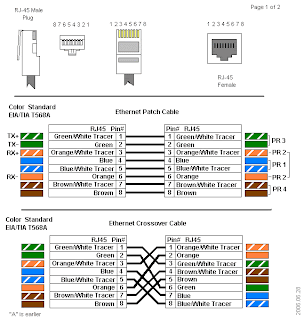
RJ45 Wiring schemes:

RJ11 Connector:
• This is a connector used for Category 1 cable which is typically used for telephone systems.
COAX Cable:
• Coaxial Cable or coax is a copper cable which has a central core made of copper which is conductive adn is covered by a shield (non-conductive) and then a braiding or foild cover surrounding it. The diaelectric insulator separated the conductor and the shield. The signal is transported in the central copper core.
Coax Cable connectors and cable types:
• RG58/U - 5mm coax cable with solid core and 50 ohms impedance, used for ethernet networking. (could also use stranded core)
• RG8 - 10mm with stranded core adn 50 ohms impedance, used for ethernet networking
• RG9 - 10mm with stranded core adn 51 ohms impedance used for television adn transmission cable modems
• RG62 - 5mm with solid core adn 93 ohms impedance, used for ARCNET networking
• RG59 - 6mm with 75 ohms impedance used for low power video connections.
• RG6 - this is the same as RG59 but is preferred.
Connectors:
• BNC (Bayone-Neill-Concelman)
o T-Connector
o Barrel Connector
o Terminator
Coax cables typically require a termination to prevent signal reflections at the end of the cable.
ThinNet
• ThinNet is the name given to ehternet networking over RG58/U or RG58A/U cabling adn is wired in a bus configuration with segments no longer the 185m.
ThickNet
• This is the name given to Ethernet NEtworking over RG8 cabling, this is not commonly used and the segments can be up to 500m
• Networking devices are not connected directly to ThickNet cables and are typically connected using vampire clamps. ThickNet segments must be terminated with a 50 Ohms terminator.
Fiber Optic Cable:
• In this the core is made up of 1 or more glass/plastic cores which is between 5 and 100 microns thick.
• Light is transmitted through the core adn reflected at various frequencies to transport data.
Fiber Optic Cable Modes:
• Single Mode Fiber:
o Carries a single optic signal (usually in the infrared spectrum)
• Step-index multimode fiber:
o Contains a core with cladding each with its own unique form index of refraction.
o When light from the core enteres the cladding a "step down" occurs due to the difference in the refractive indices. Step-index fiber uses the total internal reflection to trap light.
• Graded index multimode fiber:
o Has variations in the core glass to compensate for mode path lenght deifferences - provides more bandwith thean Step-index.
Fiber Optic Connectors:

Cable Type Properties:
10Mbps Networking
Standard Cable Type Segment Length Connector Topology IEEE Standard
10Base2 Thin Coaxial 185 meters BNC Physical bus 803.2a
10BaseT Category 3, 4, 5 twisted pair 100 meters RJ-45 Physical star
10BaseFL Fiber-optic 2000 meters SC/ST Physical star
Notes on 10Base2
Notes on 10BaseT
10BaseT networks follow the 5-4-5 rule whereby there is a maximum of 5 network segments allowed, using a maximum of 4 repeaters. All 5 segments may be populated with nodes.
Fast Ethernet Networking
Fast Ethernet defines a group of standards for networking speed of 100 Mbps
Standard Cable Type Segment Length Connector Topology IEEE Standard
100BaseTX Category 5 UTP 100 meters RJ-45 Physical Star 802.3u
100BaseT4 Category 3, 4, 5 UTP 100 meters RJ-45 Physical Star 802.3u
100BaseFX Multimode Single-mode fiber-optic 412 meters / Multimode fiber
10000 meters / Single-mode fiber SC, ST Physical Star 802.3u
FDDI Fiber Optic /
Twisted Pair (CDDI) 2000 meters SC, ST Dual Ring ANSI FDDI
Gigabit Ethernet Networking
Standard Cable Type Segment Length Connector IEEE Standard
1000BaseLX Multimode/Single-mode fiber 550/multimode 5000/Single-mode Fiber connectors 802.3z
1000BaseSX Multimode fiber 550 meters with 50 micron multimode fiber Fiber connectors 802.3z
1000BaseCX Shielded Twisted Pair 25 meters 9-pin shielded connector
8-pin fiber channel type 2 connector 802.3z
1000BaseT UTP Category 5 75 meters 75 meters 802.3ab
10 Gigabit Ethernet
Standard Transmission Type Distance Cable type Connector IEEE Standard
10GBBaseSR Baseband 33m / 300m 50 micron / 62.5 micron multimode Fiber connectors 802.3ae
10GBBaseLR Baseband 10000 meters Single-mode fiber Fiber connectors 802.3ae
10GBBaseER Baseband 40000 meters Single-mode fiber Fiber connectors 802.3ae
Normal Ethernet Cables
A normal Ethernet cable is a straight-through cable, where the smaller cables inside the Ethernet cable on both ends will be in the same order of colours, from left to right. There are two standards in which the colours of the cables are arranged, they are; T-568A and T-568B. The variation in their colour order is not an indication of their performance, but just their standard. This type of cable is used to connect the computer to a hub or router to a switch.
Ethernet Cable Categories (Cat)
An Ethernet crossover cable is a type of Ethernet cable, that is used to connect computing devices together, without the use of a hub or switch. These cables have different pin points or plugs on each side. The wires within the Ethernet crossover cable can reverse the transmit and receive signals. Starting from the left, the 1st and 3rd wires and the 2nd and 6th wires are crossed, and can be seen through the RJ-45 connectors at each end of the crossover cable.
Ethernet cable types should be determined by your requirement, as there are many types and categories easily available all across the country. Ethernet cables are faster and take less processing from the CPU and other computer networking devices, which can save a lot of time during the transmission of data.
Other Cable Types:
• Serial Cable
o Type of bounded cable to connect two devices using serial transmission, this most often uses RS232 connector
• IEEE 1394 (FireWire)
o Not a common bounded media, it contains either 4 or 6 conductorss
• USB
o Connects multiple peripherals to a single port with high performance
Serial versus Parallel:
The difference is primarily the method data is transmitted, in parallel data is typically transmit as 8bits across several channels or wires simultaneously.
USB
The current standard is 2.0 It can communicate up to 480Mbs
Firewire versus USB
Original USB was slower than Firewire, but the 2.0 is as fast or better than Firewire except on throughput, thus firewire is still used for video.
Shielding
Plenum and PVC
PVC is plastic and burns - relatively inexpensive but fire can travel along it.
Plenum is not toxic/noxious and is also fire resistent.
UNBOUNDED Network Media
Wireless communication
Electromagnetic energy such as radio, microwave or light pulses, this enables users to move more freely whilst been connected.
Point to Point Broadcast
This would be from one point to another point - like from building to building. Often used in a CAN, MAN or WAN. It couvers wide areas over a short distance.
Radio Networking
A form of wireless communication where signals are sent via RF, electical interference and buildings
Broadcast Radio
A form of RF Networking that is non directional, uses a single frequency for transmission.
RADIO TYPES OF TRANSMISSION:
• Spread Spectrum Radio (this is like SABC, sent over various channels)
o The signal is sent over more than one frequency - because the signal is split over various frequency it is more difficult to eavesdrop
• Frequency Hopping Spread Spectrum (this is like MNet)
o A signal is sent on one channel at a time; at predetermined intervals the frequency is changed. The sender and receiver use the same frequency at the same intervals to receive the information.
• Direct Sequence Spread Spectrum (DSSS)
o Uses multiple channels simultaneously to send data.
o Additionally error detection and correction techniques are used to reduce data transmission errors.
o In DSSS a single data signal is converted into multiple digital data signals called chips. The chips are sent across a wide band of adjacent channels.
• Infrared Transmission
o A form of wireless transmission over unbounded media of which signals are sent via pulses of infrared light.
o This is purely line of site, but can be reflected of surfaces.
o Infrared supports transmission rates of 10Mbs to 16Mbs
• Microwave Transmission
o This is a form of point-to-point transmission (wireless) over unbounded media where signals are sent via pulses of electromagnetic energy in the microwave region.
o Microwave must have an unobstructed view of the transceivers
Noise Control
The flow of network communications can be impaired by interference such as noise.
• Electrical noise
o Unwanted noise introduced to the network media
• Sources of Electrical Noise
o Ambient noise
Can come from many sources such as solar disturbances which affect the earth’s magnetosphere, nearby radio broadcast towers. Longer segments are more affected then shorter ones.
o Power wires
Nearby high tension wires or the buildings power cables can cause electrical noise. Network cables which run parallel to power cables are more susceptible than those that run perpendicular.
o Electric Motors
Such as those in refrigerators, lifts create noise
o Electrical heat generating devices
Same as electrical motors which draw large amounts of power on start up.
o Fluorescent lighting and HID lights
Transformers and ballasts causes noise
Noise affects power is when motors etc start up they can cause fluctuations in the power stability causing peaks and troughs in the supply which can damage equipment.
Grounding
Grounding where a cable or pipe is in direct contact with the Earth can help in curbing noise by shunting the noise into the ground.
Grounding for safety, this is important to direct power sources away from humans and into the ground.
Isolated grounds – network equipment should have isolated grounds and not common ground like a pipe. These types of grounded plug points are often orange in colour.
Shielding
Shielding is the grounded conductive material placed around the data media to block the introduction of noise into the media. The connection between the ground and the shield is called the drain and are drained in only one place to prevent a ground loop, a phenomenon where shield generates noise in the data signal.
Noise Control with Twisted Pair
• Simple, the more twists the better, the less interference or noise. This is because the tighter the twist the less surface area of the core is exposed to the air.
• Termination will also assist in the combating of noise as the signal is terminated and does not bounce around!
This is very much part of lesson 7
Network Connectivity devices:
• Network Interface Cards (NICs)
o This is also sometimes called a NAC – Network Adapter Card
o This is a transceiver (sends and receives)
o The NIC serves as the go-between between the computers data bus and the network.
o You must have a NIC to connect to a network.
• Network card busses:
o ISA – industry standard adapter (8Mbs)
o EISA – Extended industry standards adapter (16Mbs)
o PCI – 32Mbs and up
• Installing a NIC into is not that important but is on page 125 of the first text book.
Transceivers
This is a device which both sends and receives data
Repeaters
The repeater is a device which regenerates the signal to improve signal (like an amplifier) with repeaters you can stretch segments further. (Remember when you amplify the signal you also amplify any noise!)
The 5-4-3 rule fits in here but was explained earlier in this blog! As a recap:
There is a limit as to how many repeaters one can add before timing problems occur. Basically: five segments, four repeaters, three usable of populated segments.
When using HUBs the 5-4-3 rule is important, with switches you can ignore the rule!
Hubs
(The hub functions on the physical layer)
This is a networking device used to connect nodes in the physical star topology into the logical bus topology.
A good question in the exam is to explain the difference between a passive and active hub!
Managed Hub
This is a hub which includes functions that enable you to monitor and configure operation. Typically you would connect to the hub using special software; they are sometimes also called ‘intelligent hubs”
Switching Hub
This is now called a switch! This hub reads the destination address to the packed and directs it to the correct port. Switching hubs can be slower as they must process each packet. They support load balancing
Hub Speeds
Hubs support transmission speeds of 10Mbps and 100Mbps although they are typically auto sensing hubs which provide either transmission speed.
Should one PC have a 100Mbps network card installed and another a 10Mbps network card, the hub will sense this and the network will run at 10Mbps to accommodate the slower network card.
Switches
Next time!
This lesson was primarily about Media (cabling etc)
So here we go, there are quite a few definitions to follow:
• Copper Media
o This is a bounded type of meida which uses on or more copper conductors with a non conductive covering or sheath which insulates it. eg. twisted pair and coax
• Twisted Pair Cable
o Type of copper cable with colour coded wires which are twisted around each other and the have a protective cladding over them (the tighter the twist the better the shielding)
There are clour schemes attached to these twisted pairs, this is explained below:
Primary Secondary
1. White/Blue Blue/White
2. White/Orange Orange/White
3. White/Green Green /White
4. White/Brown Brown/White
• UTP versus STP
Twisted pair cable can be shielded (STP) or un-shielded (UTP) - this type of cable is available in 2 pair, 6 pair, 25 pair and 100 pair.
• UTP - this typically does not include shielding around the conductors adn usually has 4 pairs of stranded or solid conductors (copper). It is relatively inexpensive and reliable.
• STP - This includes shielding and is typically wrapped in foil wrapper is surrounding the conductors which decreases interference and noise on the line. typically also contains 4 pairs and can support distances upto 100 metres.
• To connect two Peers together (computers) you would use a cross-over cable. This eliminates the switch or if there is no uplink and downlink available on the switch.
The cable categories are as follows:

Twisted Pair Connecotrs:
Twisted pair cables always use a connector called a RJ45 - this is a 8 pin connector used for networking connections. See the image below for connections:


RJ11 Connector:
• This is a connector used for Category 1 cable which is typically used for telephone systems.
COAX Cable:
• Coaxial Cable or coax is a copper cable which has a central core made of copper which is conductive adn is covered by a shield (non-conductive) and then a braiding or foild cover surrounding it. The diaelectric insulator separated the conductor and the shield. The signal is transported in the central copper core.
Coax Cable connectors and cable types:
• RG58/U - 5mm coax cable with solid core and 50 ohms impedance, used for ethernet networking. (could also use stranded core)
• RG8 - 10mm with stranded core adn 50 ohms impedance, used for ethernet networking
• RG9 - 10mm with stranded core adn 51 ohms impedance used for television adn transmission cable modems
• RG62 - 5mm with solid core adn 93 ohms impedance, used for ARCNET networking
• RG59 - 6mm with 75 ohms impedance used for low power video connections.
• RG6 - this is the same as RG59 but is preferred.
Connectors:
• BNC (Bayone-Neill-Concelman)
o T-Connector
o Barrel Connector
o Terminator
Coax cables typically require a termination to prevent signal reflections at the end of the cable.
ThinNet
• ThinNet is the name given to ehternet networking over RG58/U or RG58A/U cabling adn is wired in a bus configuration with segments no longer the 185m.
ThickNet
• This is the name given to Ethernet NEtworking over RG8 cabling, this is not commonly used and the segments can be up to 500m
• Networking devices are not connected directly to ThickNet cables and are typically connected using vampire clamps. ThickNet segments must be terminated with a 50 Ohms terminator.
Fiber Optic Cable:
• In this the core is made up of 1 or more glass/plastic cores which is between 5 and 100 microns thick.
• Light is transmitted through the core adn reflected at various frequencies to transport data.
Fiber Optic Cable Modes:
• Single Mode Fiber:
o Carries a single optic signal (usually in the infrared spectrum)
• Step-index multimode fiber:
o Contains a core with cladding each with its own unique form index of refraction.
o When light from the core enteres the cladding a "step down" occurs due to the difference in the refractive indices. Step-index fiber uses the total internal reflection to trap light.
• Graded index multimode fiber:
o Has variations in the core glass to compensate for mode path lenght deifferences - provides more bandwith thean Step-index.
Fiber Optic Connectors:

Cable Type Properties:
10Mbps Networking
Standard Cable Type Segment Length Connector Topology IEEE Standard
10Base2 Thin Coaxial 185 meters BNC Physical bus 803.2a
10BaseT Category 3, 4, 5 twisted pair 100 meters RJ-45 Physical star
10BaseFL Fiber-optic 2000 meters SC/ST Physical star
Notes on 10Base2
- 10Base2 networks follow the 5-4-3 rule whereby there is a maximum of 5 network segments allowed, using a maximum of 4 repeaters. Only 3 of the 5 permitted segments may be populated.
Notes on 10BaseT
10BaseT networks follow the 5-4-5 rule whereby there is a maximum of 5 network segments allowed, using a maximum of 4 repeaters. All 5 segments may be populated with nodes.
Fast Ethernet Networking
Fast Ethernet defines a group of standards for networking speed of 100 Mbps
Standard Cable Type Segment Length Connector Topology IEEE Standard
100BaseTX Category 5 UTP 100 meters RJ-45 Physical Star 802.3u
100BaseT4 Category 3, 4, 5 UTP 100 meters RJ-45 Physical Star 802.3u
100BaseFX Multimode Single-mode fiber-optic 412 meters / Multimode fiber
10000 meters / Single-mode fiber SC, ST Physical Star 802.3u
FDDI Fiber Optic /
Twisted Pair (CDDI) 2000 meters SC, ST Dual Ring ANSI FDDI
Gigabit Ethernet Networking
Standard Cable Type Segment Length Connector IEEE Standard
1000BaseLX Multimode/Single-mode fiber 550/multimode 5000/Single-mode Fiber connectors 802.3z
1000BaseSX Multimode fiber 550 meters with 50 micron multimode fiber Fiber connectors 802.3z
1000BaseCX Shielded Twisted Pair 25 meters 9-pin shielded connector
8-pin fiber channel type 2 connector 802.3z
1000BaseT UTP Category 5 75 meters 75 meters 802.3ab
10 Gigabit Ethernet
Standard Transmission Type Distance Cable type Connector IEEE Standard
10GBBaseSR Baseband 33m / 300m 50 micron / 62.5 micron multimode Fiber connectors 802.3ae
10GBBaseLR Baseband 10000 meters Single-mode fiber Fiber connectors 802.3ae
10GBBaseER Baseband 40000 meters Single-mode fiber Fiber connectors 802.3ae
Normal Ethernet Cables
A normal Ethernet cable is a straight-through cable, where the smaller cables inside the Ethernet cable on both ends will be in the same order of colours, from left to right. There are two standards in which the colours of the cables are arranged, they are; T-568A and T-568B. The variation in their colour order is not an indication of their performance, but just their standard. This type of cable is used to connect the computer to a hub or router to a switch.
Ethernet Cable Categories (Cat)
- Cat 3 - This category was widely used as a voice cabling format among computer network administrators in the 1990s. It is an unshielded twisted pair (UTP) that can carry up to 10 Mbit/s with a bandwidth performance of 16 MHz.
- Cat 4 - Cat 4 was mainly used in token ring networks and the cable consists of four unshielded twisted-pair (UTP) wires, with a data rate of 16 Mbit/s, and performance of up to 20 MHz.
- Cat 5 - This is a twisted pair high signal integrity cable that has three twists per inch of each twisted pair of 24 gouge copper wires within the cables. Cat 5 is used for 10/100Mb Ethernet and as a voice cabling format.
- Cat 5e - This category is an enhanced version of Cat 5 that prevents interference between one unshielded twisted pair to another twisted pair running in parallel within the same cable (Far End Crosstalk – FEXT). It works for 10/100Mb and 1000Mb Ethernet.
- Cat 6 - It is very similar to Cat 5e and is a cable standard for Gigabyte Ethernet (considered better than Cat 5e) and other network protocols that are backward compatible with the Cat 5/5e and Cat 3 cable standards. Cat 6 is made up of larger gouge wires, that work for 10/100/1000Mb Ethernet.
- Cat 7 - This cable type is a standard for Ethernet and other interconnect technologies, that are backward compatible with traditional Cat 5 and Cat 6 Ethernet cables. As it has more strict specifications for crosstalk and system noise than Cat 6 and Cat 5e, its cables and the wires within are completely shielded. The cable contains four twisted copper wire pairs and supports up to 600Mhz.
An Ethernet crossover cable is a type of Ethernet cable, that is used to connect computing devices together, without the use of a hub or switch. These cables have different pin points or plugs on each side. The wires within the Ethernet crossover cable can reverse the transmit and receive signals. Starting from the left, the 1st and 3rd wires and the 2nd and 6th wires are crossed, and can be seen through the RJ-45 connectors at each end of the crossover cable.
Ethernet cable types should be determined by your requirement, as there are many types and categories easily available all across the country. Ethernet cables are faster and take less processing from the CPU and other computer networking devices, which can save a lot of time during the transmission of data.
Other Cable Types:
• Serial Cable
o Type of bounded cable to connect two devices using serial transmission, this most often uses RS232 connector
• IEEE 1394 (FireWire)
o Not a common bounded media, it contains either 4 or 6 conductorss
• USB
o Connects multiple peripherals to a single port with high performance
Serial versus Parallel:
The difference is primarily the method data is transmitted, in parallel data is typically transmit as 8bits across several channels or wires simultaneously.
USB
The current standard is 2.0 It can communicate up to 480Mbs
Firewire versus USB
Original USB was slower than Firewire, but the 2.0 is as fast or better than Firewire except on throughput, thus firewire is still used for video.
Shielding
Plenum and PVC
PVC is plastic and burns - relatively inexpensive but fire can travel along it.
Plenum is not toxic/noxious and is also fire resistent.
UNBOUNDED Network Media
Wireless communication
Electromagnetic energy such as radio, microwave or light pulses, this enables users to move more freely whilst been connected.
Point to Point Broadcast
This would be from one point to another point - like from building to building. Often used in a CAN, MAN or WAN. It couvers wide areas over a short distance.
Radio Networking
A form of wireless communication where signals are sent via RF, electical interference and buildings
Broadcast Radio
A form of RF Networking that is non directional, uses a single frequency for transmission.
RADIO TYPES OF TRANSMISSION:
• Spread Spectrum Radio (this is like SABC, sent over various channels)
o The signal is sent over more than one frequency - because the signal is split over various frequency it is more difficult to eavesdrop
• Frequency Hopping Spread Spectrum (this is like MNet)
o A signal is sent on one channel at a time; at predetermined intervals the frequency is changed. The sender and receiver use the same frequency at the same intervals to receive the information.
• Direct Sequence Spread Spectrum (DSSS)
o Uses multiple channels simultaneously to send data.
o Additionally error detection and correction techniques are used to reduce data transmission errors.
o In DSSS a single data signal is converted into multiple digital data signals called chips. The chips are sent across a wide band of adjacent channels.
• Infrared Transmission
o A form of wireless transmission over unbounded media of which signals are sent via pulses of infrared light.
o This is purely line of site, but can be reflected of surfaces.
o Infrared supports transmission rates of 10Mbs to 16Mbs
• Microwave Transmission
o This is a form of point-to-point transmission (wireless) over unbounded media where signals are sent via pulses of electromagnetic energy in the microwave region.
o Microwave must have an unobstructed view of the transceivers
Noise Control
The flow of network communications can be impaired by interference such as noise.
• Electrical noise
o Unwanted noise introduced to the network media
• Sources of Electrical Noise
o Ambient noise
Can come from many sources such as solar disturbances which affect the earth’s magnetosphere, nearby radio broadcast towers. Longer segments are more affected then shorter ones.
o Power wires
Nearby high tension wires or the buildings power cables can cause electrical noise. Network cables which run parallel to power cables are more susceptible than those that run perpendicular.
o Electric Motors
Such as those in refrigerators, lifts create noise
o Electrical heat generating devices
Same as electrical motors which draw large amounts of power on start up.
o Fluorescent lighting and HID lights
Transformers and ballasts causes noise
Noise affects power is when motors etc start up they can cause fluctuations in the power stability causing peaks and troughs in the supply which can damage equipment.
Grounding
Grounding where a cable or pipe is in direct contact with the Earth can help in curbing noise by shunting the noise into the ground.
Grounding for safety, this is important to direct power sources away from humans and into the ground.
Isolated grounds – network equipment should have isolated grounds and not common ground like a pipe. These types of grounded plug points are often orange in colour.
Shielding
Shielding is the grounded conductive material placed around the data media to block the introduction of noise into the media. The connection between the ground and the shield is called the drain and are drained in only one place to prevent a ground loop, a phenomenon where shield generates noise in the data signal.
Noise Control with Twisted Pair
• Simple, the more twists the better, the less interference or noise. This is because the tighter the twist the less surface area of the core is exposed to the air.
• Termination will also assist in the combating of noise as the signal is terminated and does not bounce around!
This is very much part of lesson 7
Network Connectivity devices:
• Network Interface Cards (NICs)
o This is also sometimes called a NAC – Network Adapter Card
o This is a transceiver (sends and receives)
o The NIC serves as the go-between between the computers data bus and the network.
o You must have a NIC to connect to a network.
• Network card busses:
o ISA – industry standard adapter (8Mbs)
o EISA – Extended industry standards adapter (16Mbs)
o PCI – 32Mbs and up
• Installing a NIC into is not that important but is on page 125 of the first text book.
Transceivers
This is a device which both sends and receives data
Repeaters
The repeater is a device which regenerates the signal to improve signal (like an amplifier) with repeaters you can stretch segments further. (Remember when you amplify the signal you also amplify any noise!)
The 5-4-3 rule fits in here but was explained earlier in this blog! As a recap:
There is a limit as to how many repeaters one can add before timing problems occur. Basically: five segments, four repeaters, three usable of populated segments.
When using HUBs the 5-4-3 rule is important, with switches you can ignore the rule!
Hubs
(The hub functions on the physical layer)
This is a networking device used to connect nodes in the physical star topology into the logical bus topology.
A good question in the exam is to explain the difference between a passive and active hub!
Managed Hub
This is a hub which includes functions that enable you to monitor and configure operation. Typically you would connect to the hub using special software; they are sometimes also called ‘intelligent hubs”
Switching Hub
This is now called a switch! This hub reads the destination address to the packed and directs it to the correct port. Switching hubs can be slower as they must process each packet. They support load balancing
Hub Speeds
Hubs support transmission speeds of 10Mbps and 100Mbps although they are typically auto sensing hubs which provide either transmission speed.
Should one PC have a 100Mbps network card installed and another a 10Mbps network card, the hub will sense this and the network will run at 10Mbps to accommodate the slower network card.
Switches
Next time!
Thursday, January 14, 2010
LESSON 5
So, I have been M.I.A. for a while, been holidays and Christmas, New Year etc. The last lesson we had would be lesson 5 which I will post below. (I hope I remember everything as it has been sometime since that lesson) Transmission begins below:
This lesson we looked at addressing and how the elements of a network identify each other and, well find each other. If we look at some of the gear used you will notice that they operate and communicate in different ways. Such as a Switch or a Hub do not use IP Addressing whereas a Router does (remember and router is connected out).
MAC (Media Access Address) this is the address of the network card. This is also called a physical address which is unique. A mac address is 6 bytes long - the first 3 identify the manufacturer which is referred to as the (OUI) Organisational Unique Identifier adn the remaining 3 bytes indentify the device itself called the Universal LAN MAC address.
It could look like this:
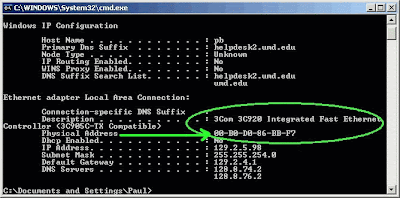
To find the MAC Address, choose START - RUN, type winipconfig/all, ENTER - for Windows NT,2000,XP,Vista and server 2000.
Windows 9x START - RUN type winipcfg
Linux - at command prompt enter ipconfig -a
Novell - at console prompt type in config
The network Card is split into the following:
Grouping - this falls under WorkGroup
ID - this also falls under WorkGroup
Protocol - this is the protocol used (set of rules) it is also known as NETBIOS adn can only be used in a WorkGroup. NETBIOS is not routable and is an accronym for: basic network input / output system.
Different departments or office spaces can be set up as WorkGroups to be able to identify and more effectively manage them. Remember that you would need a router to connect two LAN's together!
MAC Addressing is in HEX ie. 013456789ABCDEF and HEX must be grouped.
So, if MAC Address is HEX, which is numbers and letters, then:
TCPIP is Binary - IP (decimal)
(HEX : Hexidecimal, base 16, from 0 to 9 and A to F)
The next portion of Lesson 5 we spent on "How to calculate Binary", i purchased an app of the iTunes app store for $2 which made life much easier! But for the purposes of understanding the calculations, below is the process:
we draw up a simple table which I have no idea of how to get it onto this BLOG....... So use the tables that we all drew in the lesson! If I find a way, I will insert it.
Examples:
Now the reason we have been looking at calculating binary is becaeuse this comes into play when we look at IP addressing which is summarrised next:
Some interesting accronyms used during this Lesson was:
Public IP addressing = The Internet
Classfull IP Addressing is split as follows: (it kind of splits up the importance and environment)
IP Sub-net Mask
A -1 - 126 255.0.0.0
B - 128 - 191 255.255.0.0 (127 is missing as it is used for loopback, to ping your network card
C - 192 - 223 255.255.255.0
Classful means that the IP address belongs to one of the classes above A,B,C,D,E. D is used for multicast and` E is out there but not utilised, Classless provides the ability to grow the IP adress to almost anything.
This was not a long lesson as most of it was spent calculating Binary - after our holiday I am sure that we will be having a re-cap on last year, I will add it to this post!
Until Saturday, take it easy adn keep it shiny side up!
This lesson we looked at addressing and how the elements of a network identify each other and, well find each other. If we look at some of the gear used you will notice that they operate and communicate in different ways. Such as a Switch or a Hub do not use IP Addressing whereas a Router does (remember and router is connected out).
MAC (Media Access Address) this is the address of the network card. This is also called a physical address which is unique. A mac address is 6 bytes long - the first 3 identify the manufacturer which is referred to as the (OUI) Organisational Unique Identifier adn the remaining 3 bytes indentify the device itself called the Universal LAN MAC address.
It could look like this:

To find the MAC Address, choose START - RUN, type winipconfig/all, ENTER - for Windows NT,2000,XP,Vista and server 2000.
Windows 9x START - RUN type winipcfg
Linux - at command prompt enter ipconfig -a
Novell - at console prompt type in config
The network Card is split into the following:
Grouping - this falls under WorkGroup
ID - this also falls under WorkGroup
Protocol - this is the protocol used (set of rules) it is also known as NETBIOS adn can only be used in a WorkGroup. NETBIOS is not routable and is an accronym for: basic network input / output system.
Different departments or office spaces can be set up as WorkGroups to be able to identify and more effectively manage them. Remember that you would need a router to connect two LAN's together!
MAC Addressing is in HEX ie. 013456789ABCDEF and HEX must be grouped.
So, if MAC Address is HEX, which is numbers and letters, then:
TCPIP is Binary - IP (decimal)
(HEX : Hexidecimal, base 16, from 0 to 9 and A to F)
The next portion of Lesson 5 we spent on "How to calculate Binary", i purchased an app of the iTunes app store for $2 which made life much easier! But for the purposes of understanding the calculations, below is the process:
- Decimal - Base 10
- Binary - Base 2
- HEX - Base 16
we draw up a simple table which I have no idea of how to get it onto this BLOG....... So use the tables that we all drew in the lesson! If I find a way, I will insert it.
Examples:
- 0110 = 6
- 11111111 = 255
- 00000001 = 1
Now the reason we have been looking at calculating binary is becaeuse this comes into play when we look at IP addressing which is summarrised next:
- Public IP Addressing like Damelin.co.za or 192.168.7.4 or on my 3G router at home is 192.168.1.1
- Private IP Addressing is split into Static adn Dynamic (Dynamic uses DHCP)
- APIPA - (automatic Privat IP addressing) this automatically assigns an IP by Windows should the DHCP be down.
- DHCP - Dynamic Host Configuration Protocol - this leases out the IP addresses for a pre-determined time or a a random time
Some interesting accronyms used during this Lesson was:
- IRQ - interrupt request
- DMA - Direct memory access
Public IP addressing = The Internet
Classfull IP Addressing is split as follows: (it kind of splits up the importance and environment)
IP Sub-net Mask
A -1 - 126 255.0.0.0
B - 128 - 191 255.255.0.0 (127 is missing as it is used for loopback, to ping your network card
C - 192 - 223 255.255.255.0
Classful means that the IP address belongs to one of the classes above A,B,C,D,E. D is used for multicast and` E is out there but not utilised, Classless provides the ability to grow the IP adress to almost anything.
This was not a long lesson as most of it was spent calculating Binary - after our holiday I am sure that we will be having a re-cap on last year, I will add it to this post!
Until Saturday, take it easy adn keep it shiny side up!
Thursday, November 26, 2009
Lesson 4
Okay, so a bit late but I have been having a hectic week - I thought that I would sneak this in at work! Don't bust me!
So in this lesson we looked again at the planning of a site: (inside of the OSI model covering, Network, Datalink and Physical)
With the redundancey and the mirrioring of the servers you have two options:
'
Load balancing - this is when the domain controllers can replicate in both directions to share the resource when the network is under pressure (help each other out)
With the domain controllers there are two types that we looked at this weekend and they are:
We looke at the Firewall - this could be the server - a Proxy server can be chosen to aid in the firewall - this is created in the domain controller server. The proxy stores the sites in cache and retains the handshakes up until the time you shut down your machine (like the proxy when it does this on your behalf!). The Proxy is the DMZ (demilitarised zone) on the domain controller. - this is a bit confusing, do some more research and draw your own pictures!
The area between the proxy adn the domain controller is called this DMZ. Proxy's can be set up to filter sites visited like porn etc (must filter Facebook!!!) The Proxy can also filter ports like a port associated with the Internet is port 80.
in the Network layer (MESH) and there are routers involved when you have a WAN remember, as soon as you have more than one network card it becomes a router!
A router changes a public IP address into a private IP address ( it translates like MODEM this can also be a gateway)
We then looked at the transmission methods:
Baseband and Broadband - baseband uses all the available bandwidth and broadband uses only sections of the bandwidth.
Bandwidth can be used as:
Communication method categories include transmission, media access and signalling.
Media Access methods
Only 1 node can transmit at a time, the media access method determines whether or not a particular node can place data on the network a any given time. Ther are two categories: contention based or competitive media access. The nodes negotiate themselves for media access time with deteministic medai access a centralised device or system contriols when and for how long they can transmit.
Multiplexed Media Access
Multiplexing is a controlled media access whcih a central device combines the signals from multiple nodes and transmits the joined signal across the medium.
Signals can be multiplexed by using either TDM (time division multiplexing) or FDM ( frequency division multiplexing) the central device that the rely on is called a MUX (multiplexer) - at the other end a DEMUX or demultiplexer separates the signal again.
(token ring environment)
Polling is s acontrolled media access method where a central device contacts each node to see if it has data to transmit, each node has guaranteed access but time is wasted polling nodes that have nothing to transmit.
Demand Priority
This is a polling technique where the nodes signal their state - either ready to transmit or idle not ready to an intellegent hub. The hub favours high pripority transmission requests.
Now for an important bit of revision! NBNBNB
CSMA/CD adn CSMA/CA - carrier sense multiple access with dollison detection or collision avoidance!
CSMA/CD - this is a contention based media access method, they must detect and manage the inevitable collisons that occur on the network when mulitple nodes transmit at the same time. They detect a collision and then re-transmit at a later time, these times are set at random amounts to avoid further collisions.

Each time that you have a DC you have a domain, each time that you have a switch you have a collision domain - think of the building we planned!
A collision / contention domain is the SAME thing.
The last topic is SIGNALING METHODS:
Analogue Signals
Analogue signals form a contiuous wave
Digital Signals
Unlike the analaogue signal wave which can have multiple values depending on the amplitude the digital wave only has two values, ones and zeros (on or off)

So in this lesson we looked again at the planning of a site: (inside of the OSI model covering, Network, Datalink and Physical)
- Where to put the backbone (if there is a central lift shaft this is good!)
- Where to put the IT department (in the middle somewhere to reduce the length of cable between the workstations and the server)
- Decide on what medium to use for the backbone (we looked at fibre or STP dependending on the budget and how fancy you want to be)
- Decide on a topology (per floor or department in the building)
- Remember that the backbone needs to be terminated at each end!
- Decide on the minimum data speed 100/1000
- Once a decision is made on the backbone speed, everything else should be in line with this decission - of course the last section connecting to the workstations would be fine with 100 megs
- Decide on redundancy
- Server with a mirroring server
- Server connected to a switch which distributes to switches on each floor
- Switches on each floor could be connected in duplicate to the switch at the server
- 8, 16, 32, 64, 128 ports - decide on what is necessary, this would depend on the number of employees with an idea of possible growth and upgradeability.
- WAP - wireless access point is another switch which you could use
With the redundancey and the mirrioring of the servers you have two options:
- Intrasite - means that both servers are on site so both domain controllers are mirrored on site
- Intersite - means that there is off-site replication (domain controller on-site replicates with a DC off site to cover you in the event of fire and floods etc)
'
Load balancing - this is when the domain controllers can replicate in both directions to share the resource when the network is under pressure (help each other out)
With the domain controllers there are two types that we looked at this weekend and they are:
- Post 2000 - this has no hierarchy and both would be equal, thus the the DC can be primary or back-up
- Pre 2000 - (NT server) here there was hierarchy and the DC would be primary or back-up, this was PDC or BDC (primary domain controller or back-up domain controller)
We looke at the Firewall - this could be the server - a Proxy server can be chosen to aid in the firewall - this is created in the domain controller server. The proxy stores the sites in cache and retains the handshakes up until the time you shut down your machine (like the proxy when it does this on your behalf!). The Proxy is the DMZ (demilitarised zone) on the domain controller. - this is a bit confusing, do some more research and draw your own pictures!
The area between the proxy adn the domain controller is called this DMZ. Proxy's can be set up to filter sites visited like porn etc (must filter Facebook!!!) The Proxy can also filter ports like a port associated with the Internet is port 80.
in the Network layer (MESH) and there are routers involved when you have a WAN remember, as soon as you have more than one network card it becomes a router!
A router changes a public IP address into a private IP address ( it translates like MODEM this can also be a gateway)
We then looked at the transmission methods:
Baseband and Broadband - baseband uses all the available bandwidth and broadband uses only sections of the bandwidth.
Bandwidth can be used as:
- Unicast - like a two way radio (simplex)
- Broadcast - like SABC (this goes to everyone - switch or hub using 802.3)
- Multicast - like M-net - only broadcast to certain specific groups
- Unicast - Unicast transmission is a method where data is transferred fro a specific source address to a specific detsination address
- Broadcast - is a method in which data goes from a source node to all other nodes on a network.
- Multicast - is a transmission method in which data is sent from a server to specific nodes that have been defined as members of a multicast group.
Communication method categories include transmission, media access and signalling.
Media Access methods
Only 1 node can transmit at a time, the media access method determines whether or not a particular node can place data on the network a any given time. Ther are two categories: contention based or competitive media access. The nodes negotiate themselves for media access time with deteministic medai access a centralised device or system contriols when and for how long they can transmit.
Multiplexed Media Access
Multiplexing is a controlled media access whcih a central device combines the signals from multiple nodes and transmits the joined signal across the medium.
Signals can be multiplexed by using either TDM (time division multiplexing) or FDM ( frequency division multiplexing) the central device that the rely on is called a MUX (multiplexer) - at the other end a DEMUX or demultiplexer separates the signal again.
- TDM - divides the signal into discrete time slots
- FDM - data is sent over different frequencise or channels (put together again on the other side)
(token ring environment)
Polling is s acontrolled media access method where a central device contacts each node to see if it has data to transmit, each node has guaranteed access but time is wasted polling nodes that have nothing to transmit.
Demand Priority
This is a polling technique where the nodes signal their state - either ready to transmit or idle not ready to an intellegent hub. The hub favours high pripority transmission requests.
Now for an important bit of revision! NBNBNB
CSMA/CD adn CSMA/CA - carrier sense multiple access with dollison detection or collision avoidance!
CSMA/CD - this is a contention based media access method, they must detect and manage the inevitable collisons that occur on the network when mulitple nodes transmit at the same time. They detect a collision and then re-transmit at a later time, these times are set at random amounts to avoid further collisions.
- A node has to transmit
- The node determines if the media is available
- If it is it transmits the data
- The node determines if a collision has occurred by detecting the fragmented data that results from the collision
- If a collision has occurred, the node waits for the random "back-off" period which is in milliseconds and the repeats from 1 above.
- A node has data to transmit
- The node checks to see if the media is available
- If it is available it transmits a "jam" signal, which lets the other nodes aware that it intends to send (advertises)
- The node waits until all the other nodes should have had time to recieve the jam signal
- The node transmits its data
- While it is busy transmitting it monitors the media for a jam signal from other nodes on the network, if it recieves a jam signal from another node, it stops transmitting adn retries after a random delay.
This is also known as a collision domain - this is where a groiup of nodes compete with each other for access to the media. So, by deviding your network in various / many contention / collision domains will reduce the possibility of collisions.

A collision / contention domain is the SAME thing.
The last topic is SIGNALING METHODS:
Analogue Signals
Analogue signals form a contiuous wave
Digital Signals
Unlike the analaogue signal wave which can have multiple values depending on the amplitude the digital wave only has two values, ones and zeros (on or off)

Terms:
Amplitude: - the height or depth of a wave from its midpoint to the top or the bottom.
Cycle: - One complete oscillation
Frequency: - The number of complete cycles per second (measured in hertz)
Phase: - Where the cycle begins in relation to a fixed point, so if two waves start at the same time - they are in phase - think of electricity and a video camera showing lines on a tv
Wavelength: - The distance between the successive peaks in a waveform
That's all for now - expect the next post next week!
Sunday, November 15, 2009
Lesson 3
With this lesson we continue with Topology - but, we start to look at the LOGICAL topology now. Remember that Physical was the tangible side of things, thus the Logical is the flow of data - we cannot see this! :)
- Logical Bus Topology
- Logical Ring Topology
In the logical ring topology, the signal is sent around the Ring like a dog chasing it's tail - it always travels in a clockwise direction. (a token continually travels around the ring looking for information to pick up from the network card and transport it to the required destination)
- Logical Star Topology
This is a topology which is implemented less frequently than a Ring or bus. In the star, the nodes are connected to a central device and are all on the same bus cable. The central device continually polls the nodes to determine if the need to send information. This can be more complex and a MUX (multiplexer) can be used - this will split up different sections of the network and send only to the section that requires it.

- MSAU / MAU - multi-station access unit
When you have two different standards, namely 802.3 and 802.5 in a situation where you have a MAU, for the two topologies to be able to connect, you would require some sort of "gateway" which translates the one standard into the other so that they may communicate - this is also a good way to safeguard your network (security).
In Lesson 3 we had a look at what we would need to consider should be be designing the architecture of a network in a building, in the points following we will list the necessary steps or things to consider.- How many floors is the building? Always try to put your server room in the centre of the building to reduce cable pulls.
- Where is the lift shaft? Usually in the middle of the building - this shaft provides you with a good spot to run your cables from floor to floor - cables need to be shielded in this environment.
- decide on a topology for the network per floor
- decide on a minimum network speed - then ensure that your back-bone which runs up and down the lift shaft is of maximum speed.
- a patch panel (there would more than like be one for the telephone system) will be required on each floor to distribute that cables to each topology on each floor, this patch panel will hold the switch and the switch is connected to the server via the back-bone.
- The switches on each floor could also be MAU devices.
- Server room should be off the ground level if possible - water issues
- Your back-bone through the lift shaft must be terminated on each end.
- where the back-bone connects to the server, you need to focus on the failure points here, you could have a switch or multiple switches between the back-bone and the server or servers to lessen the chances of failure due to cable breaks.
- Server mirroring will also reduce the effects of failure, redundancy is important!
- Network Categories
Local area network - this is a self-contained network which covers a defined small area such as an office. Can be connected directly via cable or via wireless technologies
 WAN
WANWide area network - this is a network which spans a large and multiple geographic locations (much like a national or international company) it would connect multiple LANs.
Now this gets interesting as a WAN is the basis of the Internet as when a a device has more than one connection it becomes a Router. Thus each LAN is connected via the WAN which includes TELECOMS.
A WAN will always use a MESH topology. SO you can see how the Internet is a giant WAN connecting all the computers around the globe, A Mesh has at least 4 connections per workstation.Lastly there are some other Networks listed below:
- MAN - metropolitan area network, imagine the city's network
- CAN - Campus area network, imagine the network that UCT might have
- PAN - Personal area network, this connects 2 or 3 workstations together, imagine the network you might have at home or in a small office.
- WPAN - wireless personal area network, this is a small network much like the PAN but uses wireless technology rather the a wired/cabled network.
Lesson 2
So, I was unable to make it to this class so there might be one or two things missing or extra as I tried to fill in the blanks.

Lesson 2 primarily focuses on the topology of a network, this can be split up into:
- Physical topology (architecture)
- Logical topology
The physical topology is how the network actually looks, how is has been laid out with cables etc.
The logical topology is the route that the data follows - this is what you can't see!
The physical topologies that we look at are:
- The Physical Bus topology
This is where nodes are arranged in a linear fashion - one after the other, each node is directly connected to the network cable (backbone) with a T-connector and then by a BNC connector directly to the node. Think of peer-peer. These types of networks are not very reliable as if there is a break in the cable, the entire network goes down, they are also typically slow and difficult to troubleshoot. The backbone must have terminators on each end so that when information is broadcast, it knows where to end! (can't use UTP in bus)
- Physical Star Topology
This type of architecture uses a central device from which all nodes branch off or connect. A device such as a HUB or Switch. When using a hub, the signal is broadcast to all, when using a switch there is some intelligence as the switch has record of where the nodes are situated on the physical topology. Thus it will be a bit faster.
- Physical Ring Topology
This is a layout whereby each node is connected to its nearest node and the signal travels like a dog chasing it's tail. Each node then amplifies the signal to the next node. The signal always travels in a clockwise direction around the ring. The nodes will have network cards with an "in' and "out" point which determines the upstream and downstream node. Failure of a node could potentially bring down the entire network.
- Physical Mesh Topology
This is when each nodes is connected to each and every other node
 In this mesh topology, each node has 4 network cards in it, the mesh is very difficult to fail as it always has a redundancy to the entire network. In the Physical Mesh, the data will always follow OSPF - open, shortest path first! NB!!!
- Hybrid Topology
This is exactly as it says - it is a hybrid between two or more topologies.
The acronyms that we need to know and some other points to remember:
- T.T.L. - time to live (the amount of time given to a signal, its life)
- UTP - unshielded twist pair (cable) - Connects to a RJ45
- STP - shielded twisted pair (cable) - connects to a RJ45
- Coax - cable with a core and a protective sheath (like television cable)
- Fibre - shielded cable with a glass core
- CSMA/CD - carrier sense multiple access with collision detection (802.3) Ethernet
- CSMA/CA - carrier sense multiple access with collision avoidance (802.5)
- UTP - cannot be used in a bus topology
- In the exam, we will need to know and be able to draw the types of topologies!
- Below is some cable information:


Saturday, October 31, 2009
Network + : Damelin College Mowbray
So, I am studying the N+ course through Damelin and have decided to use my blog as a medium to summarise lessons that I and my classmates can use as a reference to help with studying! I hope that my fellow classmates make use of it and also find it useful - all feedback will be appreciated!
Lesson 1
The OSI model (Open System Inter-connect): this is a 7 layered model which covers all the aspects in the environment of computing, the steps are as follows:
Lesson 1
The OSI model (Open System Inter-connect): this is a 7 layered model which covers all the aspects in the environment of computing, the steps are as follows:
- Physical Layer - Media, signal and binary transmission (can also be the hub or repeater)
- Data Link - Physical addressing (The switch would fit in here)
- Network - Path determination and logical addressing (the router would fit in here)
- Transport - end to end connections and reliability
- Session - Interhost communication
- Presentation - data representation and encryption
- Application - network process to application
1 - 3 are physical (hardware) and 4 - 7 are logical (software, services)
The OSI model would work in order of sent i.e. the sending device would send in order of 1 to 7 and the receiving device would receive as 7 to 1.
Here is some terminology that we learnt and need to know:
- Networks - To communicate and share resources which could be files, printers and email
- Network components -
- Device - any hardware
- Media - connects devices to the network and carries the data between
- Network adapter - hardware that translates the data between network and device
- Network operating system - (NOS) - software that controls traffic and resources
- Protocol - set of rules for communications
Servers
Server is a network computer which shares resources with and responds to requests from other network computers.
Clients
Also known as a node or peer, this is a network computer which utilises the resources of other network computers. This client computer has its own processor, memory and storage.
Peers
Self sufficient computer which acts as both a server and client to similar computers on its network.
They have decentralised security and will have a DOS running (like XP) and not a NOS (Server 2003/8)
Host Computers
A powerful centralised computer system such as a mainframe computer that performs data storage and processing on behalf of clients.
TCP/IP
TCP/IP is routable (routers can and need to be used and not switches) The router recognises, for leaving the network to get to the www.
Terminals
Terminals have a chip on the network card which is called a PROM (Programmable Read Only Memory) It is a specialised network device on a host-based network that transmits the data entered by the user to to the host for processing and then displays the result ( like a bank teller) - these terminals are often called "dumb".
Authentication
This is network security measures to gain access to the network resources
- Username and passwords - usernames are usually public info and are often available, the password is secret and should be protected at all costs.
Network Directory Services
A network Directory is a a centralised hierarchical database which stores and organises data about network users and resources - we will be using MS Active Directory (all control is here)
Some important notes to remember:
- DOS, like XP is Disc operating system
- NOS, like server 2003 is Network operating system
- Persons have permissions and resources have rights
- SMTP - simple mail transfer protocol
- TCP/IP - transmission control protocol / Internet protocol
- 802.3 - ethernet
- 802.5 - token, ring environment
- 802.11 - Wireless
- Server client - provides better security and is centralised
- Peer to Peer - less security and is decentralised
- HUB or Repeater - broadcasts to everyone on the network
- Switch - has some intelligence and will remember the MAC address of computers in its network
- Router - uses TCP/IP and not MAC
There are two types of servers:
- Member servers - provide resources such as databases (SQL, sequel server)
- Domain Controller - Authenticates users, contains the directory services (Active Directory) which contains all users, rights and permissions
Servers need to provide:
- ACCESS
- FAULT TOLERANCE
- SECURITY
- HIGH AVAILABILITY
Subscribe to:
Posts (Atom)